
How We Built LLM-Powered Autocomplete for AI Agents
How Rapidflare engineered LLM-powered autocomplete for AI agents, delivering suggestions in under 300ms with three-layer personalization.

Though the entire world is well versed now with chatting with conversational AI agents, it can still feel daunting to land on the chat interface of a purpose built agent and see a blinking cursor. While not quite as severe as writer’s block, we’ve noticed that this speed bump in expressing one’s thoughts often leads to sub optimal agent usage or abandoned sessions.
The agent is only as good as the question it receives.
We decided to fix the input, not just the output.
Why LLM Autocomplete Works Better Than Static Suggestions
Search engines have had autocomplete for decades. Google practically trained an entire generation of humans to let suggestions guide their searches. But when it comes to LLM powered agents, other than coding agents, no one seems to build this in.
The reason is simple: autocomplete is traditionally built as precomputed indexes of possible searches ranked by popularity. However with conversational agents, every conversation is freeform and open ended. There’s no query log to pattern-match against. You need to generate completions, not look them up.

So we built an LLM-powered autocomplete. In our electronics focused conversational agents, the user starts typing, and within ~300ms, they see AI-generated suggestions grounded in a combination of precomputed product intelligence, peer user query patterns and personalization based on past behaviors.
It’s not just convenient. It steers behavior.
Steering Users Toward Better AI Questions
The first instinct is to treat autocomplete as a UX nicety, saving keystrokes. That undersells it.
Think about what Google’s autocomplete actually does. When you type “how to” and see trending suggestions, Google isn’t just predicting your query. It’s shaping what you explore. It’s directing traffic.
We seek to do the same thing, but this time based on pre-structured product intelligence.
Our agent knows hundreds of products. It has spec sheets, comparison data, use-case guides. But users don’t know what’s in there. Autocomplete becomes the discovery layer - it tells users what questions are worth asking.
And because we have analytics on every conversation (what products get asked about, which questions get good answers, what people’s colleagues are exploring), we can bias suggestions toward topics where the agent delivers. We’re not just completing sentences. We’re steering users toward productive conversations.
How We Personalize Query Suggestions in Real Time
We didn’t want suggestions that feel generic. So we built three context layers that feed the LLM:
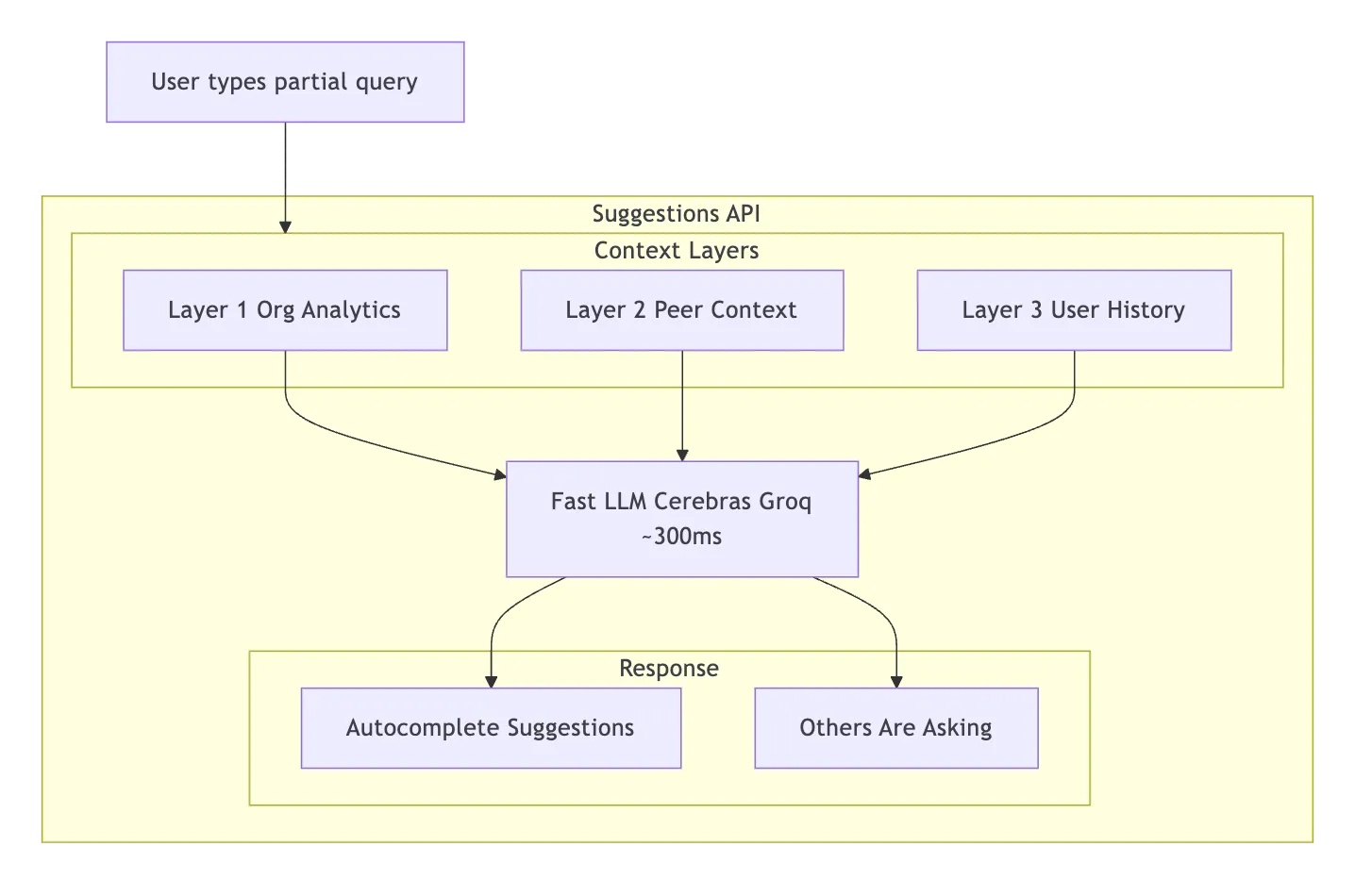
| Layer | Signal | What it does | Example |
|---|---|---|---|
| Org Analytics | ”Questions that work” | Top products, success rates, thumbs-up queries. Steers toward topics the agent answers well. Also deprioritizes topics with low success rates — steer away from dead ends. | ”Product X gets asked about 40% of the time with 95% answer rate — bias suggestions toward it.” |
| Peer Context | ”Your colleagues also asked…” | Recent queries from other users. Social proof — shows up as a separate “Others are asking” section in the UI. | An engineer sees a colleague asked about a product comparison yesterday. FOMO kicks in. |
| User History | ”Where you left off” | This user’s recent conversation topics. Suggests follow-ups and deeper dives, not repeats. | Instead of “How can I get started?” → “Want to compare Product X with the alternative you looked at yesterday?” |
All three layers are fetched concurrently. The whole context-gathering step adds ~50-100ms.
Going Fast Without Hallucinating
Autocomplete lives or dies on two things: latency and grounding. If suggestions take 2 seconds, the user has already typed their question and hit send. If suggestions hallucinate product names that don’t exist, you’ve actively misled the user. You need both speed and accuracy.
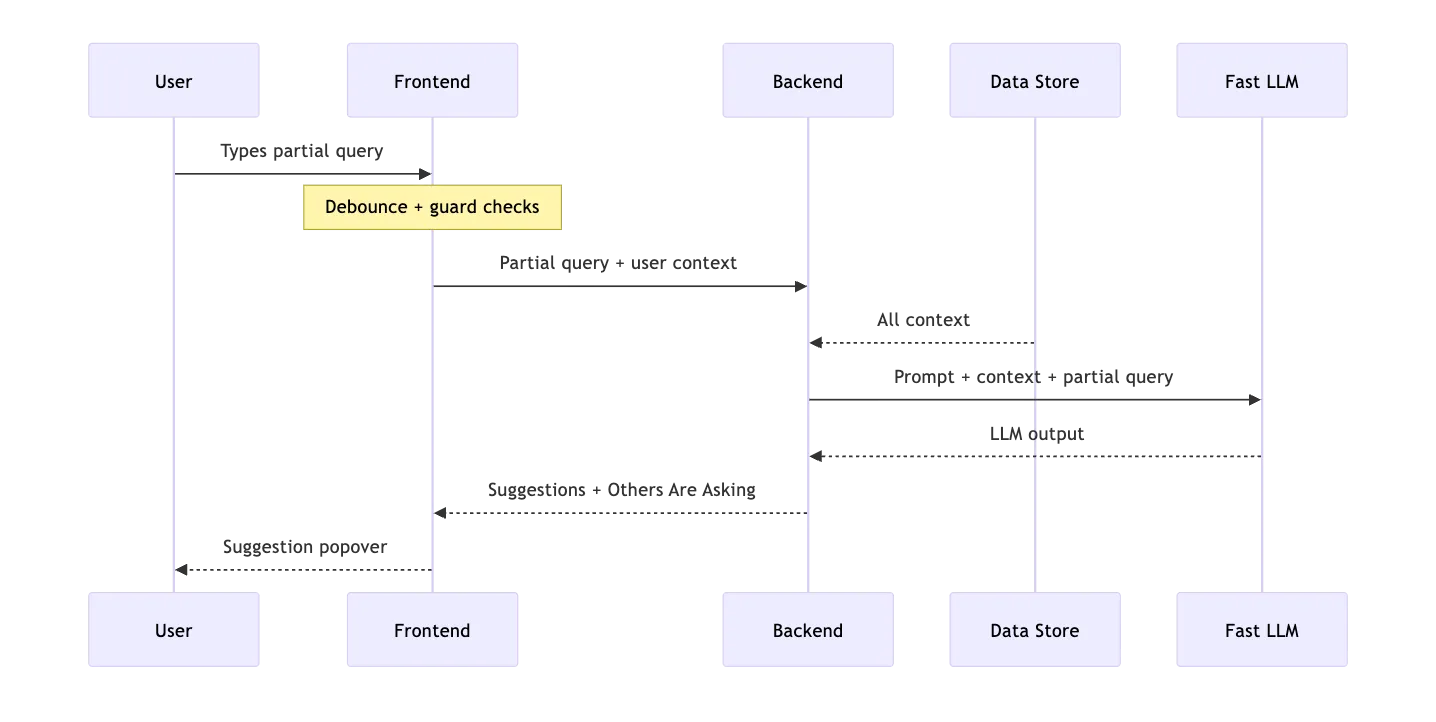
Speed: We don’t use the same LLM for autocomplete that we use for answering questions. The answer LLM is slower but more capable — it reasons over retrieved documents. The autocomplete LLM just needs to generate a few short sentences from a well-crafted prompt. We use Cerebras (via Groq) for fast inference — 5-10x faster than standard providers. We return structured JSON via a Pydantic schema, not freeform text that needs regex parsing. Total LLM latency: ~200-300ms.
Grounding: The biggest risk is the LLM suggesting a comparison between two products that don’t exist in the catalog. We prevent this by stuffing the prompt with real data — the actual product catalog (IDs, families, types), example questions from the agent’s starter prompts, and thumbs-up questions that real users asked and rated positively. The LLM learns what “good” looks like for this specific agent. Plus a hard rule: “ALWAYS limit scope to the products and knowledge base available to the agent.”
Temperature 0.3 ties it together. OpenAI recommends temperature 0 for “factual use cases such as data extraction and truthful Q&A.” We bump it to 0.3 because we’re not doing pure extraction — we want slight variety so suggestions don’t feel robotic across repeated requests. Just above factual, just below creative.
What Made It Hard
The AI part was the easy part. One prompt, one LLM call, structured JSON out. What actually took the time:
The frontend. 400 lines of state management. Debouncing (400ms — don’t fire on every keystroke), aborting stale requests, keyboard navigation, prefix highlighting, anti-spam guards. Each suggestion costs real money, so we cap at 3 API calls per session with reCAPTCHA on each. We only show suggestions on fresh conversations — once you’re mid-conversation, the agent has enough context and autocomplete would just get in the way.
Keeping the LLM honest. Early versions hallucinated product names or used generic placeholders like “your product.” The fix wasn’t temperature tuning — it was putting the actual product catalog in the prompt and adding a hard scoping rule. We also cap context aggressively (10 example questions, 20 thumbs-up queries, 15 peer queries, 10 user queries) to avoid blowing the context window on large catalogs.
Latency tail. Cerebras/Groq averages ~200-300ms, but spikes to 800ms+ during load. At 800ms, the user has finished typing. The 400ms debounce helps — we start fetching context while they’re still typing, so the LLM call fires the instant they pause.
Why It Gets Better Over Time
The part we’re most excited about isn’t any single layer — it’s the feedback loop.

Every conversation makes the system smarter. Popular products bubble up. Proven questions get reinforced. Bad topics drop in the analytics and get naturally deprioritized. Nobody curates this. It just happens.
Everyone in the AI space is racing to build better answers. We think the bigger lever is asking better questions. Autocomplete is how you get there - not by predicting keystrokes, but by steering every conversation toward value before it even starts.